2. Access Control Software, Lifetime License

$299.00
Access Control Software + 1 Reader Connection Included
Lifetime Windows software package for centralized access control management. Manage users and credentials, assign access permissions and schedules, monitor access events and operate multiple compatible Fresh USA readers from one software system.
- Lifetime software package — $299
- License for 1 connected reader included
- No mandatory monthly fee
- User, vehicle and credential management
- Access permissions and time schedules
- Real-time access events, history and reports
- Multiple compatible readers and access points can be managed from one software system
Additional readers:
One compatible reader connection is included with this software package. Each additional connected reader requires one Additional Reader Connection License.
Windows software.One software license is required for each computer running the licensed Access Control Software.
Description
Fresh USA Access Control Software
Windows software for centralized management of compatible Fresh USA access control readers, users, vehicles and credentials. The standard software package includes one lifetime license for one Windows computer and one compatible connected reader, with no mandatory monthly Fresh USA software subscription.
Access Control Software Package
Fresh USA Access Control Software provides centralized management for compatible vehicle, gate, parking and other access control applications.
Authorized users, vehicles and credentials can be registered in the software and assigned access permissions. Connected readers report access events to the software, creating a centralized record of activity at monitored entrances and access points.
The system can start with one connected reader and can be expanded with additional compatible readers and access points as the project grows.
What Is Included
| Included | Description |
|---|---|
| Fresh USA Access Control Software | Windows software for access control management, credentials, permissions, schedules and access-event records. |
| Windows computer license | One lifetime software license for one Windows computer. |
| Reader connection | License for one compatible connected Fresh USA reader is included with the standard software package. |
| License term | Lifetime license for the licensed Windows computer. |
| Monthly Fresh USA software fee | None. |
| Additional readers | Each additional compatible connected reader requires one Additional Reader Connection License. |
Computer-specific lifetime license
The software license file is tied to the motherboard of the specific computer for which it is issued. The license cannot be transferred to another computer. Installation on a different computer requires a new software license.
User, Vehicle and Credential Management
The software maintains a centralized database of authorized users, vehicles and compatible access credentials.
Depending on the installed equipment and project configuration, credentials can include compatible:
- Vehicle windshield tags and stickers
- Access cards
- Key fobs
- Other compatible Fresh USA credentials
Each credential can be assigned to the appropriate user, vehicle or access record and managed through the software database.
Access Permissions and Schedules
Software-managed access control allows permissions to be configured according to the requirements of the facility.
- Add or remove authorized users and vehicles
- Add, edit or remove access credentials
- Assign access permissions
- Configure permitted access times and schedules
- Manage multiple compatible access points
- Update access rights without replacing the physical credential
Real-Time Access Events and History
Connected readers can report credential activity to the Windows software, allowing access activity to be monitored and stored in a centralized database.
Depending on the system configuration, available information can include:
- Detected credential
- Registered user or vehicle
- Reader or access point
- Date and time of the event
- Access activity history
- Searchable event records
- Access control reports
Entry and Exit Monitoring
For applications where entry and exit must be recorded separately, separate readers can be installed for each direction.
| Configuration | Typical Operation |
|---|---|
| One reader | One monitored detection point. Suitable when separate entry / exit direction records are not required. |
| Entry reader + exit reader | Separate readers allow the software to distinguish events occurring at the designated entry and exit points. |
| Multiple entrances | Additional compatible readers can be added and managed through the same software system. |
Multiple Readers and Multiple Computers
The system can be expanded for facilities with multiple gates, entrances, parking lanes or Windows workstations.
| Configuration | Licensing |
|---|---|
| 1 Windows computer | One Access Control Software license. |
| 1 connected reader | Included with this $299 software package. |
| 2 connected readers | First reader connection included + 1 Additional Reader Connection License. |
| 4 connected readers | First reader connection included + 3 Additional Reader Connection Licenses. |
| Additional Windows computers | Each additional Windows computer running the licensed software requires its own software license. |
1 Reader Connection Included
The $299 Access Control Software package includes activation for one Windows computer and a license for one compatible connected Fresh USA reader.
Each additional reader connected to the software system requires one Additional Reader Connection License.
Reader Communication
Compatible Fresh USA readers can communicate with the software through supported network or serial communication methods, depending on the reader model and system configuration.
TCP/IP communication is commonly used for network-connected installations with one or more access points.
Reader IP address, communication settings and other parameters are configured during system setup.
Access Control Equipment
The software is designed to operate with compatible Fresh USA access control equipment configured for software-managed operation.
Typical projects can include:
- Vehicle gate access control readers
- Parking entrance and exit readers
- Garage and barrier access systems
- Compatible building or controlled-entry readers
- Multiple readers connected through the local network
Hardware selection and reader range depend on the required application, credential type, entrance geometry and installation conditions.
Gate, Barrier and Door Integration
Compatible Fresh USA access control systems can be integrated with gate operators, barrier arms, garage doors, turnstiles and other controlled-entry equipment that provides a compatible control input.
The access control reader or system controller provides the appropriate access signal after an authorized credential is recognized.
Existing gate or door equipment must provide a compatible control input.
Access control equipment should not directly power a gate motor, electromagnetic lock, barrier motor or other high-current device. Final wiring must follow the requirements of the gate, door or access-control equipment manufacturer and applicable life-safety requirements.
Software-Managed vs. Standalone Operation
Many Fresh USA access control systems can operate either as standalone access-control devices or as part of a software-managed system.
| Feature | Standalone | Software-Managed |
|---|---|---|
| Windows computer | Not required for routine access operation | Required |
| Authorized credentials | Stored and processed locally by compatible equipment | Centrally managed through the software database |
| Access schedules | Depends on equipment configuration | Centrally managed through software |
| Centralized access history | Limited or not centralized | Yes |
| Multiple readers | Readers can operate independently | Multiple compatible readers can be centrally managed |
| Mandatory monthly Fresh USA fee | No | No |
Software Download and User Manual
Software installation files and the Access Control Software User Manual are available through Fresh USA software resources.
Download Access Control Software v2.2
View Access Control Software Installation and User Guide
View Software Information and System Requirements
Software download and license activation are different.
Access to the software installation package does not provide licensed reader connectivity. This product includes one lifetime Windows software license and one compatible reader connection. Each additional connected reader requires an Additional Reader Connection License.
Typical Applications
- Gated communities and HOAs
- Apartment and condominium parking
- Commercial parking facilities
- Employee parking entrances
- Private vehicle gates
- Warehouse and industrial vehicle entrances
- Garage doors and controlled parking areas
- Barrier-arm access control
- Commercial and facility access points
- Multi-entrance access control projects
What Is Not Included with This Software Package
Unless specifically included in a written quotation or order, the standard software package does not include:
- Access control reader hardware
- Additional Reader Connection Licenses beyond the first included reader connection
- RFID cards, windshield tags, key fobs or other credentials
- F-02 Tag Encoder / Writer
- Gate operators, barrier arms, doors or locks
- Computer hardware
- Network equipment or network installation
- On-site installation or deployment services
Frequently Asked Questions
Is this a subscription?
No. This product provides a lifetime Fresh USA Access Control Software license for one Windows computer. There is no mandatory monthly Fresh USA software subscription fee.
What is included in the software package?
The package includes one lifetime Access Control Software license for one Windows computer and one compatible connected Fresh USA reader connection.
Is a Reader License included?
Yes. One compatible reader connection is included. Each additional connected reader requires one Additional Reader Connection License.
Can I connect several readers to one computer?
Yes. Multiple compatible readers can be managed from the same software system. The first reader connection is included, and each additional connected reader requires one Additional Reader Connection License.
How many software licenses do I need?
One software license is required for each Windows computer running the licensed Access Control Software.
Can I move my software license to another computer?
No. The software license file is tied to the motherboard of the specific computer for which it was issued. Installation on a different computer requires a new software license.
Can the software manage access schedules?
Yes. Software-managed access can use access permissions and schedules to control when registered credentials are authorized at configured access points.
Does the software keep access history?
Yes. Compatible connected readers can report access activity to the software, allowing events to be stored and reviewed through the centralized database.
Can I use one credential at multiple access points?
Compatible credentials can be assigned permissions for the appropriate access points within the software-managed system. Access rights can be configured according to the project requirements.
Can the system distinguish entry from exit?
Yes, when separate readers are installed and configured for the designated entry and exit points. A single reader provides one detection point and does not by itself identify two separate directions.
Does the software work without Internet access?
Routine operation can be performed over the configured local system or network. Internet access may still be required for downloading files, activation or remote technical support.
Can additional entrances be added later?
Yes. Compatible readers and access points can be added as the project expands. Each additional connected reader requires the appropriate Additional Reader Connection License.
Planning a Multi-Reader Access Control System?
Send the number of entrances, gates or parking lanes, the number of Windows computers, approximate reading distance and the types of credentials you want to use.
Fresh USA can determine the required readers, software licenses, Additional Reader Connection Licenses and compatible credentials for the project.
Email Software Project Information
Phone: +1 (312) 312-9608
Related products
-
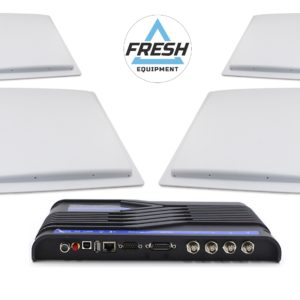
9.c) F-6950 RFID UHF Multi-Antenna Reader Kit – 4 × 12 dBi Antennas
$1,990.00 Add to cart -
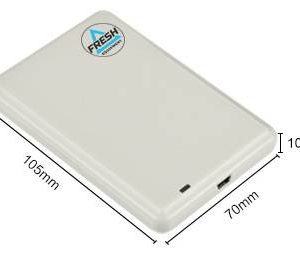
Tag writer, encoder F-02 for writing RFID UHF Tags
$139.00 Add to cart -

Affordable Access Control System with 2 Card Readers & Video Intercom
$299.00 Add to cart -

RFID UHF Access Cards, 200pcs.
$159.00 Add to cart
